

Let’s be real: we’ve spent the last decade obsessing over the “golden trio” of email marketing—the sender name, the subject line, and that sneaky little snippet of text we call the preheader. We’ve A/B tested them to death, trying to find the perfect hook to get people to click.
But here’s the thing: as of March 2026, the rules of the game didn’t just change—the board was flipped over.
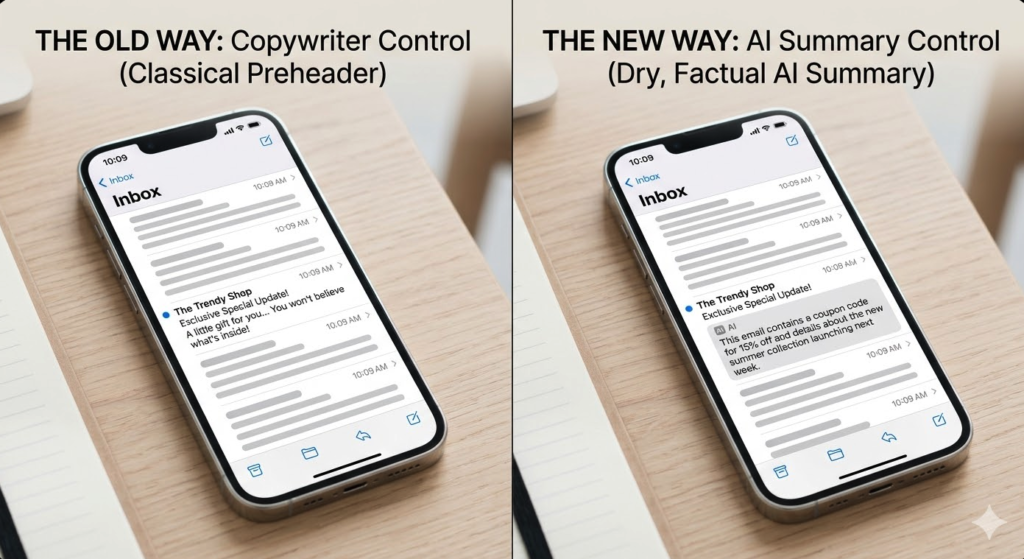
If you’ve opened your inbox lately on an iPhone or updated your Gmail app, you’ve probably noticed something different. Instead of that clever “Open this to see your surprise…” preheader you carefully scripted, you’re seeing a dry, clinical summary of what’s actually inside the email.
The AI has moved in, and it’s started reading our mail before our subscribers do. My honest thoughts? The traditional preheader is dead. And if you don’t change how you write your first paragraph, your open rates are going to follow it into the grave.
1. The Rise of AI Email Summaries: What Just Changed
For years, the preheader was our “second subject line.” It was the place for mystery, for “Wait, there’s more!”, or for that one-liner that didn’t fit in the 40 characters of a mobile subject line.
But in the last few months, specifically with the March 2026 rollout of Gemini-powered summaries in Gmail and the full integration of Apple Intelligence in Mail, the inbox has become machine-mediated.
Here is what’s happening:
– Apple Mail (which accounts for roughly 50% of all email opens) now uses its on-device AI to scan the entire body of your email. Instead of displaying the first few lines of text (the preheader), it generates a 1-2 sentence summary of the actual content.
– Gmail’s Gemini expansion has followed suit. For users in the Workspace and AI Premium tiers, the “Promotions” tab is no longer a chronological list. It’s a curated feed where AI summaries often replace the snippet text to help users “save time.”
Why does this matter? Because the AI doesn’t care about your “curiosity gap.” It doesn’t care about your clever wordplay. It wants to tell the user exactly what is in the email so they can decide not to open it if it’s not relevant. We’ve lost control of the first screen, and that is a massive shift for anyone who relies on email to drive revenue.
2. How AI Actually Reads Your Emails
To fix this, we have to understand how the “AI brain” works. Unlike a human who might be intrigued by a vague hint, the algorithm is a literalist. It scans your text for nouns, verbs, and data points. It looks for the “essence” of the message.
If your email starts with:
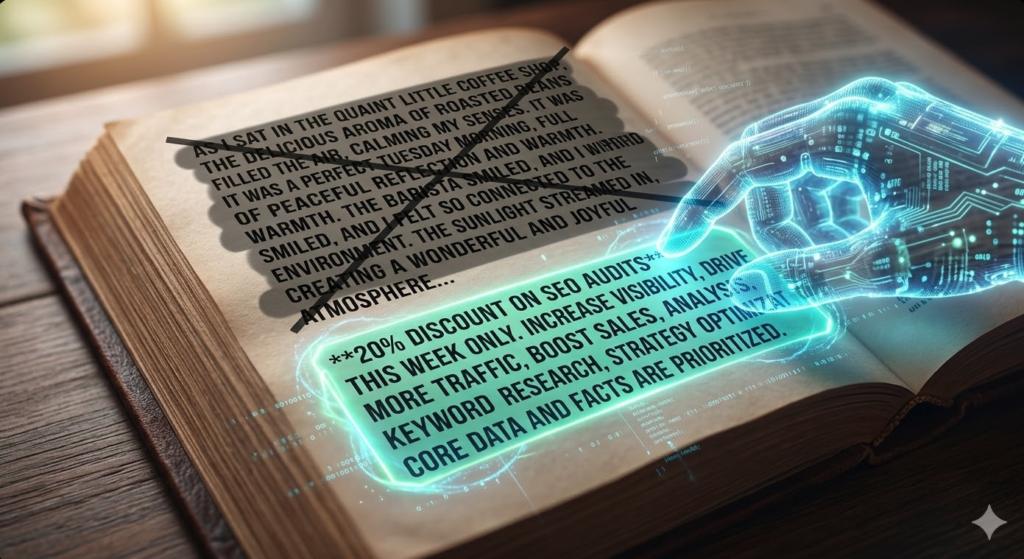
“Hey friend! I was sitting in a coffee shop today thinking about how hard it is to grow a business…”
The AI ignores the coffee shop. It ignores your feelings. It looks further down. If the middle of your email mentions a “20% discount on SEO audits,” the AI summary will simply say: “The sender is offering a 20% discount on SEO auditing services.”
The “Clickbait” Filter
The biggest casualty here is clickbait. AI models are now trained to ignore “urgency signals” that aren’t backed up by facts. If your subject line says “URGENT: ACTION REQUIRED” but the AI sees it’s just a newsletter about your latest blog post, the summary will reflect the blog post, not the fake urgency.
Marketers are losing control. If you write your emails the “old way”—burying the lead under three paragraphs of storytelling—the AI will dig it up and put it on the front porch for everyone to see before they even open the door.
Before and After: The First Screen Evolution
The Old Way (What we used to see):
– Subject: A little gift for you…
– Preheader: You won’t believe what’s inside this email! Open now to find out…
The New Way (What the AI shows now):
– Subject: A little gift for you…
– AI Summary: This email contains a coupon code for 15% off your next purchase, expiring on Friday.
See the problem? The mystery is gone. If the user doesn’t want 15% off right now, they won’t open. The “teaser” is completely bypassed.
3. The New Rules of Email Copywriting
So, how do we adapt? If the AI is going to summarize us anyway, we need to give it the right things to summarize. We have to stop writing for the “open” and start writing for the “summary.”
Rule #1: Facts First (The TL;DR Approach)
You have to put your main offer or your most important point in the very first paragraph. No more “I hope this finds you well.” No more long-winded stories about your weekend.
My Honest Advice: Treat your first sentence like a press release. If the AI is going to pull a summary, make sure it pulls the one you want.
Rule #2: Drop the Abstract Storytelling
I love a good story as much as anyone, but if your story doesn’t get to the point within the first 100 words, the AI is going to “spoil” the ending in the inbox summary. If you want to use storytelling, lead with the “Why” and then tell the story after the main point.
Rule #3: Machine-Readable Structure
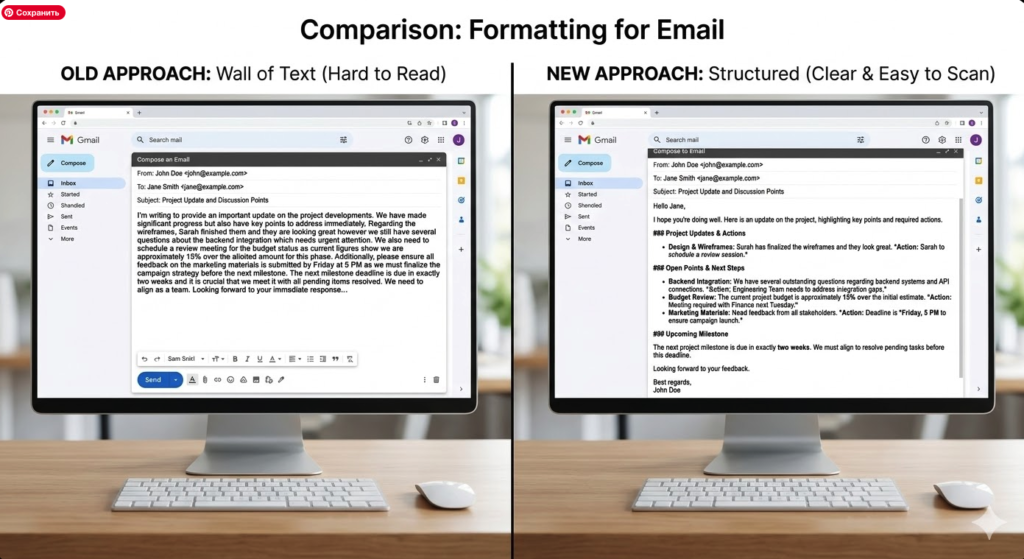
AI loves lists. It loves bold text. It loves clear headers. By using a structured format, you’re helping the algorithm understand the hierarchy of your information.
Examples: Before vs. After
Old Opening (Story-heavy):
“Hi Elena, I was looking at my calendar this morning and realized that it’s already March. Time flies! It reminded me of when I first started marketing and how overwhelmed I felt. That’s why I decided to create something to help you…”
New Opening (AI-Optimized):
“Hi Elena, I’ve just released a new Checklist for Marketing Software 2026 to help you stop overpaying for tools. This guide covers the top 5 platforms for small businesses and includes a pricing comparison table. I remember feeling overwhelmed when I started, which is why…”
In the “New Opening,” the AI has everything it needs to create a high-value summary: a specific product (Checklist), a specific benefit (stop overpaying), and a clear topic (top 5 platforms).
4. What This Means for Your Open Rates
I’ll be honest with you: I haven’t found exact industry-wide data on the long-term impact of AI summaries on Open Rates yet. We are only a few weeks into this “new world.”
However, early observations from my own tests and discussions in the marketing community suggest a “Polarization Effect”:
1. Low-Value Emails are dying. If your email is just “checking in” or has a weak offer, the AI summary makes it very easy for people to ignore. Open rates for these are plummeting.
2. High-Value Emails are winning. If your first paragraph clearly states a benefit that the user needs right now, the AI summary acts like a high-converting ad. People open because they already know it’s worth their time.
The connection is clear: The structure of your first paragraph is now more important than your subject line. If the first paragraph is vague, the AI summary will be vague (or worse, inaccurate), and your open rate will suffer.
Wrapping Up
The era of the “clever” preheader is over. We are moving into the era of the Transparent Inbox.
The AI isn’t our enemy—it’s just a very efficient filter. If you want to get through that filter, you have to stop hiding your value. Put your facts first, use a clear structure, and give the AI something worth summarizing.
Let’s be real: people are busier than ever. They don’t want to be “teased”; they want to be helped. Write your emails to be helpful from the very first word, and the AI will do the rest of the work for you.
If you’re feeling a bit lost with how to restructure your openings, I’ve put together some (https://egerionreviews.com/) that are specifically designed to play nice with the 2026 AI algorithms. Go grab them and let’s get those open rates back up.
Sources
- MarTech: How Gemini in Gmail changes inbox visibility for marketers (March 4, 2026) – Detailed breakdown of Gmail’s Al integration.
- Linkedin: Apple’s Al Inbox Changes Email Marketing Strategy – Discussion on Apple
Intelligence replacing preheaders. - Brivio Health: The 2026 Email Marketing Shift – Impact of Al summaries on B2B email performance.
- Google Workspace Blog: Gemini Expansion in Gmail and Docs – Official announcement of Al summary features.
- HubSpot: State of Marketing Report 2026 – Data on Al adoption and its effect on engagement metrics.