


Implementing DMARC in 2026 is no longer optional; it is the fundamental requirement for survival. My honest thought: this isn’t an article about configuration. This is an article about survival.
Enough with phrases like “it’s recommended to set up DMARC.” That’s not a recommendation. That’s the difference between your emails reaching your customer’s inbox or quietly dying somewhere inside Gmail’s servers with zero notification.
Here are the numbers, straight up: only around 937,000 domains worldwide even have a valid DMARC record — and of those, only 412,000 actually block anything (p=quarantine or p=reject). The rest are sitting on p=none, thinking they’re protected. They’re not. They’re just watching themselves get spoofed in real time. [1]
Since November 2025, Google has moved from soft warnings to permanent email rejection. Microsoft rolled out the identical enforcement model that same month. [2] This isn’t a future threat. It’s already live, right now, rejecting non-compliant mail at the SMTP level before it ever reaches an inbox. [3]
And here’s what matters: on May 21, 2026, the IETF officially published DMARCbis — three new RFCs (9989, 9990, 9991) replacing the original 2014 specification. This isn’t cosmetic. It’s a signal that the industry now treats DMARC as formal infrastructure, not an optional checkbox. [1]
There’s no hard calendar deadline like “September 1” written anywhere in Google’s, Yahoo’s, or Microsoft’s official documentation. But that’s worse than a deadline. There’s no single date — requirements are just quietly and continuously tightening. Throttling and filtering arrive before full blocking does, and that’s exactly what makes this dangerous: you won’t get an email saying “you have 30 days.” You’ll just notice one day that your open rate dropped 40%, and you won’t know why.
Why DMARC in 2026 is critical for deliverability
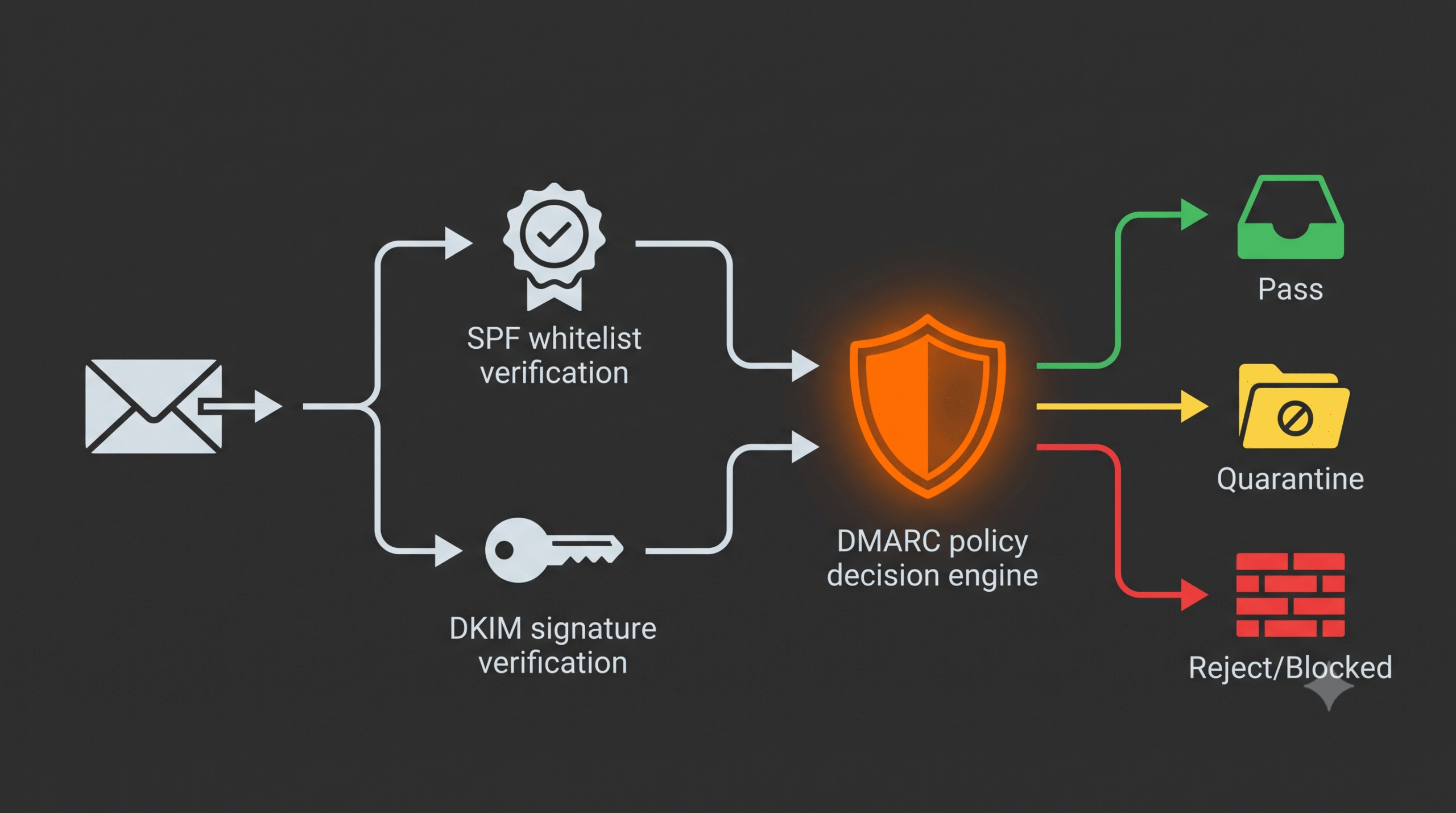
Three acronyms that work together like an identity verification chain.
SPF — the list of servers allowed to send email on behalf of your domain. Think of it as the list of people authorized to sign documents in your name.
DKIM — a digital signature on every email confirming it wasn’t tampered with in transit. A wax seal on the envelope.
DMARC — the rule that tells receiving mail servers what to do if SPF or DKIM checks fail. Accept it? Send it to spam? Reject it outright? DMARC is the decision, not another checkpoint.
Without DMARC, you can have perfectly configured SPF and DKIM — and someone can still send phishing emails impersonating your domain, because there’s no rule telling mailbox providers “reject anything that fails verification.”
Action Plan: The One-Evening Checklist
1. Check Your Domain's Current Status
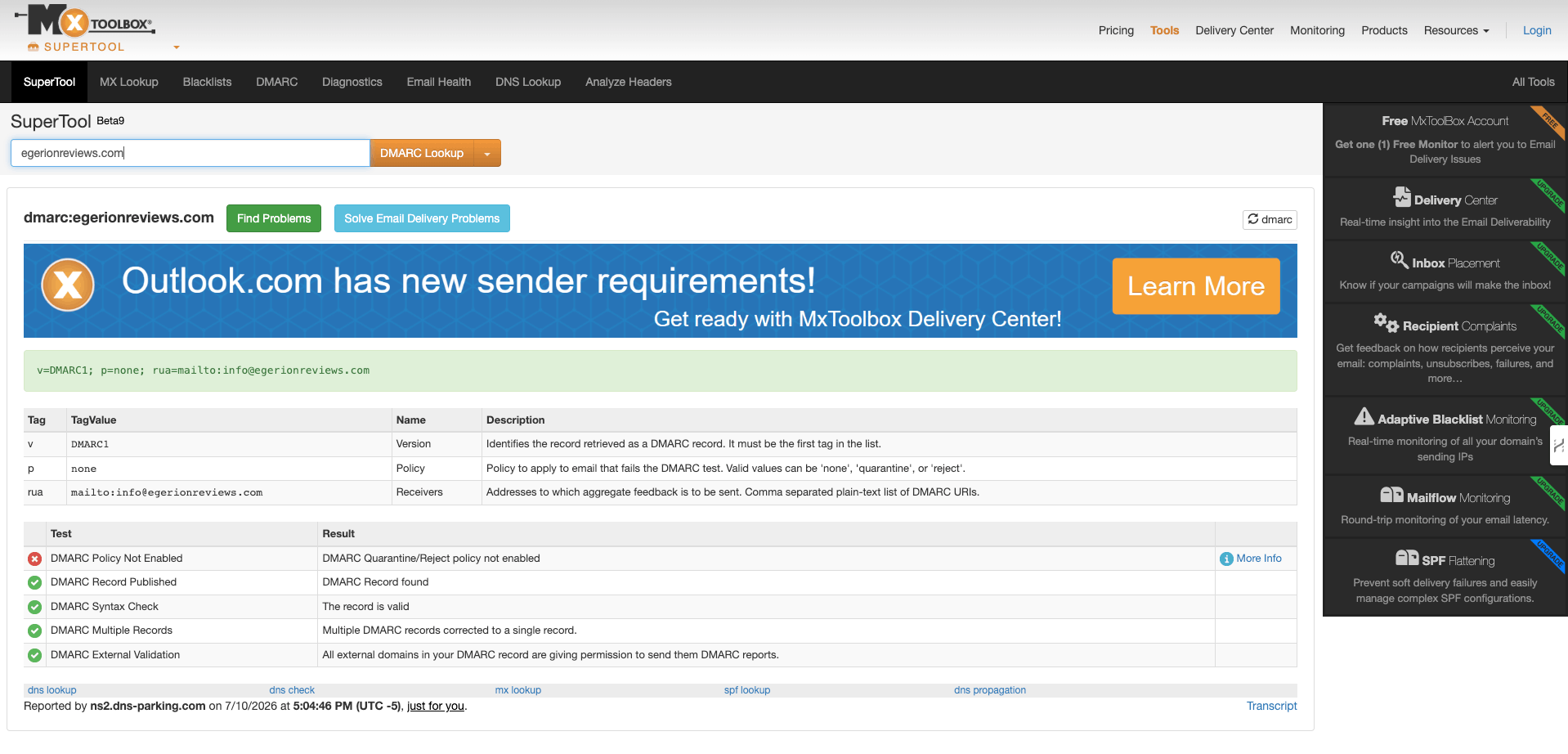
Don’t guess. Go to MXToolbox DMARC Lookup [9] and enter your domain. In 10 seconds you’ll see whether you have a DMARC record at all, and if so, what policy it’s set to.
At the same time, check your SPF record using the same MXToolbox — a separate SPF Record Lookup tool. If you see a “too many DNS lookups” error, that’s a separate issue you need to fix first. The limit is 10 lookups, and every new tool in your stack (CRM, helpdesk, ESP) adds one more. Exceed it, and SPF breaks entirely — for every sender at once.
2. Configure Your SPF Record
Go to your domain’s DNS settings — your hosting provider or a separate DNS manager like Cloudflare. Find the DNS Records or DNS Zone Editor section.
Name: @ (or your domain)
Value: v=spf1 include:_spf.yourESP.com ~all
Replace yourESP.com with your email service’s actual SPF include. If you have multiple senders — CRM, helpdesk, marketing platform — all includes must live in one record, not several. Multiple SPF records on a single domain break the check completely.
3. Set Up DKIM
This happens inside your email service’s dashboard, not manually in general DNS settings. Go to Domain Authentication or Sender Authentication within your ESP. It will generate CNAME or TXT records — copy those into your domain’s DNS.
Running WordPress with MailPoet? Go to MailPoet → Settings → Sending → Authentication — there’s a step-by-step wizard right there.
If you’re using HubSpot and haven’t connected a sending domain, it silently falls back to a domain like user=yourcompany.com@hs-domain.com, and DMARC alignment breaks instantly. Check this first if HubSpot emails aren’t arriving. [5]
4. Publish the DMARC Record
Name: _dmarc
Value: v=DMARC1; p=none; rua=mailto:dmarc-reports@yourdomain.com
Set it to p=none? Don’t relax — you’re still just watching from the bushes. This isn’t protection, it’s evidence-gathering. You’re seeing who’s using your domain and how — but you’re not blocking anything yet. The real work starts once we enable blocking in the next stages. SPF and DKIM need to run stable for at least 48 hours before moving forward — otherwise you risk blocking your own legitimate email. [6]
5. Monitor Reports for 2–4 Weeks
Reports will land at the address in your rua= field. The format is unreadable to the human eye — use a free parser like dmarcian or Red Sift. The goal: confirm every legitimate source (ESP, CRM, transactional mail) is passing consistently. [4]
6. Move to p=quarantine, Then p=reject
Reports coming back clean? Update the record in stages:
Weeks 3–6:
Start with pct=10 — apply the policy to just 10% of mail — and gradually ramp to 100% while watching the reports.
Move to p=reject only once the pass rate for authorized senders exceeds 98%. Full rollout typically takes 4–12 weeks — don’t floor it early. [6]

The Risks: What Happens If You Ignore This
Straight, no cushioning.
Your emails will be silently rejected. Full rejection enforcement has been active at Google and Microsoft since November 2025. SMTP code 550 — the email isn’t delivered, and the recipient gets no notification. [7]
Your domain stays open to spoofing. Of the roughly 937,000 domains with DMARC, only 412,000 actually block anything. The rest are just spectators to their own impersonation. [1]
If you process payments, this is no longer optional. PCI DSS v4.0 formally requires DMARC for any organization handling cardholder data. Non-compliance is a direct risk of losing the ability to process payments — that’s a defined consequence written into the standard itself. [3]
Organizations with full DMARC enforcement see roughly a 10% lift in deliverability. That’s not a rounding error — that’s the difference between your sales funnel arriving or going silent. [5]
Domain reputation recovery takes months. Setting this up ahead of time is dramatically cheaper than cleaning up the mess once your domain is already blacklisted. [8]
Conclusion: Check Your Domain Right Now, Not Tomorrow
Open MXToolbox. Type in your domain. It’ll take less time than reading this article did.
See “no DMARC record found”? You’ve got one evening to fix it — before this turns into an investigation of why your customers aren’t getting their order confirmations.
This isn’t a task for “the IT department, eventually.” This is a task for you, tonight.
Now that your DMARC is fixed and emails are reaching the inbox, make sure you are using the right automation tool. Read my full performance test: HubSpot vs GetResponse vs ActiveCampaign (2026).
Sources
- PowerDMARC: DMARC Requirements 2026, DMARCbis RFC 9989-9991 — powerdmarc.com/dmarc-requirements
- PowerDMARC: Gmail Enforcement 2025 — Google Begins Rejecting Emails — powerdmarc.com/gmail-enforcement-email-rejection
- Mimecast: DMARC Google, Yahoo, Microsoft Requirements — mimecast.com/blog/guide-to-google-dmarc-setup
- Red Sift: Bulk Email Sender Requirements Checklist 2026 — redsift.com/guides/bulk-email-sender-requirements
- Prospeo: DMARC Google Setup Guide — Fix Rejections in 2026 — prospeo.io/s/dmarc-google
- DuoCircle: DMARC Policy Rollout Strategy for Microsoft 365 and Google Workspace — duocircle.com
- Ironscales: Google’s November 2025 DMARC Crackdown — ironscales.com
- DMARC Report: Why Gmail Rejects Messages Under Strict DMARC — dmarcreport.com
- MXToolbox — Free DMARC, SPF, DKIM Lookup Tool — mxtoolbox.com/SuperTool.aspx