

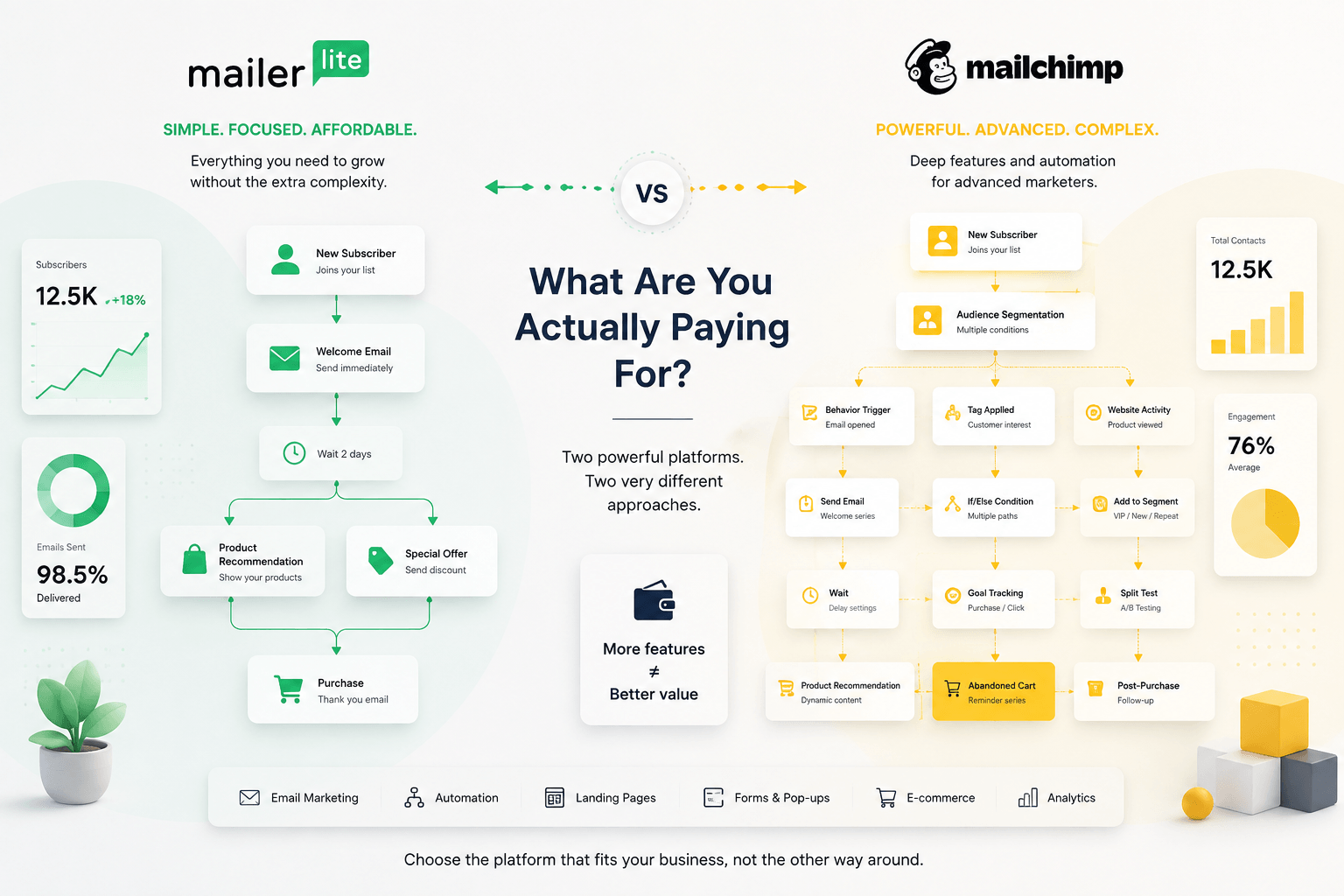
If you’re choosing between MailerLite and Mailchimp in 2026, the real question isn’t which platform has more features.
Mailchimp has plenty.
The better question is simpler: how much are you paying for those features, and will you actually use them?
If you’re choosing between MailerLite and Mailchimp in 2026, the real question isn’t which platform has more features—especially when industry benchmarks and metrics can often be misleading.
MailerLite takes a different approach. It focuses on email, automation, landing pages and audience growth without making the whole experience feel unnecessarily complicated.
So let’s compare the two on the things that actually affect a small business: pricing, contact limits, automation, email editors, ecommerce workflows and deliverability.
The Short Version
If you want the answer before getting into the details:
MailerLite is the better value for most small businesses, creators and lean ecommerce teams.
Mailchimp makes more sense when you actually need its broader ecosystem, deeper behavioral tools or more advanced marketing capabilities.
That last part is important.
If you’re paying for Mailchimp Standard just to send newsletters, build a welcome sequence and recover abandoned carts, you’re probably paying for more platform than you need.
If you’re running a much more complicated customer journey with multiple behavioral conditions and detailed segmentation, Mailchimp’s extra capabilities can be useful.
Here’s the basic difference:
| CRITERIA | MAILERLITE | MAILCHIMP |
|---|---|---|
| Best for | Small businesses, creators, lean ecommerce | Businesses needing a broader marketing ecosystem |
| Free plan | 250 active subscribers / 2,500 emails | 250 contacts / 500 sends |
| Entry paid plan | Comfort from $12/mo | Essentials from $13/mo |
| Advanced automation | Strong for standard workflows | Stronger for complex journeys |
| Visual editor | Simpler and easier to navigate | More feature-rich, but more complex |
| Ecommerce | Strong core ecommerce tools | More advanced ecommerce ecosystem |
| Integrations | 150+ | 300+ |
| Billing basis | Active subscribers | Contacts |
| Overall value | Excellent | Strong, but more expensive as you scale |
Prices are based on the vendors’ published US pricing available in August 2026. Final prices can vary by billing terms, currency and taxes. (mailerlite.com)
1. Pricing: This Is Where Things Get Interesting
Let’s start with the part nobody enjoys discovering after building an entire email system: the bill.
MailerLite changed its paid-plan structure in 2026. The current plans are Free, Comfort, Power and Enterprise. (mailerlite.com)
The Free plan supports 250 subscribers and 2,500 emails per month. It also includes visual automation, landing pages, forms and A/B testing, although the exact feature limits are tighter than on the paid plans. (mailerlite.com)
Comfort starts at $12/month for up to 500 subscribers, while Power starts at $25/month for up to 500 subscribers. Comfort gives you a monthly sending allowance based on your subscriber tier, while Power includes unlimited monthly email sending subject to fair-use rules. (mailerlite.com)
At several common list sizes, Power currently costs approximately:
| SUBSCRIBERS | MAILERLITE POWER |
|---|---|
| 500 | $25/month |
| 2,500 | $49/month |
| 5,000 | $69/month |
| 10,000 | $179/month |
| 25,000 | $239/month |
| 50,000 | $389/month |
Now look at Mailchimp.
Its Free plan also supports up to 250 contacts, but the monthly sending allowance is only 500 emails, with a 250-email daily limit. Mailchimp says sending is paused when the Free plan’s contact or sending limits are exceeded. (Mailchimp)
Essentials starts at $13/month for up to 500 contacts, while Standard starts at $20/month for the same contact tier. Mailchimp’s Standard plan is also the more relevant comparison if you need its enhanced automation and behavioral features. (Mailchimp)
This is where the comparison needs a little care.
MailerLite Power and Mailchimp Essentials aren’t equivalent plans. Essentials is Mailchimp’s lower-cost entry point, while Standard is where more of its advanced marketing functionality becomes relevant.
So if you’re comparing automation capabilities rather than simply looking for the cheapest subscription, MailerLite Power vs. Mailchimp Standard is the more useful comparison.
At 5,000 contacts, that means roughly $69 vs. $100 per month.
That’s a $31 monthly difference.
For a large company, it may not matter.
For a small business, it might.
2. The Free Plans: MailerLite Gives You More Room to Actually Use It
Both platforms currently cap their free plans at 250 contacts, so neither is especially generous on list size.
The difference is the sending allowance.
MailerLite:
250 subscribers + 2,500 emails/month.
Mailchimp:
250 contacts + 500 emails/month.
That difference is significant when you’re just starting.
Imagine a small online store collecting subscribers through a simple popup:
“Get 10% off your first order.”
You send a welcome email, a product recommendation and one newsletter each week.
With MailerLite, there’s enough room to experiment.
With Mailchimp, 500 monthly sends disappear quickly.
For a business that is still figuring out its email strategy, MailerLite’s free plan is simply more practical. (mailerlite.com)
There’s another small detail worth watching. MailerLite is introducing tighter landing-page limits for the Free plan in August 2026, with one published landing page on Free, compared with higher limits on paid plans. (mailerlite.com)
So even MailerLite’s free offer isn’t unlimited. The difference is that it remains useful enough to test the platform properly before paying.
3. Automation: MailerLite Is Easier. Mailchimp Goes Deeper.
This is probably the most important functional difference.
MailerLite’s automation builder is built around a visual workflow.
A typical ecommerce sequence might look like this:
New subscriber → Welcome email → Wait 2 days → Product recommendation → Clicked? → Yes/No branch → Follow-up
You can see the whole journey on one screen.
For a small team, that matters more than it sounds.
You don’t want to spend your morning configuring the automation instead of working on the campaign.
MailerLite supports triggers, delays, conditions, actions and branching logic. Its paid plans expand the number and complexity of automations considerably. (mailerlite.com)
Mailchimp can go further.
Its automation system supports behavioral triggers, branching customer journeys, segmentation and personalization, with Mailchimp currently advertising more than 45 behavioral triggers. (Mailchimp)
That’s useful when you have a lot of customer data to work with.
It’s also where Mailchimp starts to feel more complicated.
The platform has accumulated a very large set of marketing features. Once you move beyond a simple campaign, there are more settings, conditions and options to deal with.
That’s not necessarily a problem.
If you need them, they’re valuable.
But if your automation is simply:
Subscribe → Welcome → Product recommendation → Purchase → Follow-up
you don’t need a spaceship to drive to the supermarket.
MailerLite generally gets you there with less configuration.
4. Email Editors: Less Friction Matters
MailerLite’s email editor is one of its strongest areas.
The drag-and-drop editor is straightforward, and the platform provides reusable content blocks that make it easy to build a professional campaign without touching HTML. (mailerlite.com)
For a small ecommerce team, this is exactly what you want.
Change the product image.
Update the price.
Replace the CTA.
Send the campaign.
You don’t want to spend twenty minutes figuring out where a particular content block disappeared.
Mailchimp’s editor is more mature and offers a broad range of templates and customization options. (Mailchimp)
But the trade-off is familiar: more options can mean more interface.
For someone who manages email every day, that may be perfectly fine.
For a founder who writes the newsletter between customer support messages and inventory updates, a simpler editor can be a real advantage.
5. Ecommerce Automation: Mailchimp Has More Depth, But MailerLite Covers the Essentials
This is where I wouldn’t simply declare a winner.
An ecommerce email strategy isn’t just about sending a newsletter.
You want to react to what customers actually do.
Someone subscribes.
They browse a product.
They leave.
They come back.
They add the product to their cart.
They don’t finish the purchase.
Then, three days later, they buy something completely different.
The value of automation comes from being able to react to those events.
MailerLite supports ecommerce integrations and automation for platforms including Shopify, WooCommerce and BigCommerce. Its ecommerce tools cover the core workflows a small store is likely to need. (mailerlite.com)
Mailchimp has a broader ecosystem and more advanced behavioral capabilities, particularly when you start working with larger datasets and more complicated customer journeys. Its Shopify integration, for example, is built around personalized email and SMS automation using Shopify data. (Mailchimp)
So I’d put it this way:
MailerLite wins on simplicity.
Mailchimp wins on depth.
For a small store with a few dozen products, I would rather have the simpler system.
For a larger ecommerce operation with multiple customer segments and a dedicated CRM or marketing team, Mailchimp’s additional capabilities become easier to justify.
6. Deliverability: Don’t Choose Based on a Marketing Number
This is one area where email marketing comparisons often get a little too enthusiastic.
Mailchimp advertises a 99% deliverability rate on its paid plans. (Mailchimp)
That sounds impressive, but there’s a problem with treating that number as a universal inbox-placement guarantee.
Deliverability depends on the sender as much as the platform.
Your domain reputation matters.
Authentication matters.
List hygiene matters.
Spam complaints matter.
Engagement matters.
And Gmail, Outlook and Yahoo ultimately decide what happens to your messages.
Independent testing gives us a more useful perspective.
As of August 2026, EmailToolTester’s latest testing gives MailerLite an average 94.41% deliverability rate across its five most recent testing rounds, and MailerLite retained the publication’s “Best of 5” deliverability award. (EmailTooltester.com)
That is a strong result.
It still doesn’t mean every email from every MailerLite customer will reach the inbox.
And I wouldn’t choose MailerLite over Mailchimp solely because of that number.
The more useful question is whether the platform makes it easy for you to maintain a clean database, authenticate your domain, segment engaged subscribers and avoid sending irrelevant campaigns.
A well-managed list on an ordinary platform can outperform a badly managed list on a premium one.
7. Contact Limits Can Become a Hidden Cost
Here’s something worth checking before you choose an ESP.
Your “database size” isn’t necessarily the same thing as your active marketing audience.
Mailchimp’s pricing is based around contact tiers, and its documentation explains that contacts can include different contact statuses depending on the account and plan. MailerLite, by comparison, says it counts active, unique subscribers for billing. (Mailchimp)
Why does that matter?
Imagine your store has accumulated 8,000 contacts.
Only 5,500 are actively subscribed.
The rest are unsubscribed or otherwise no longer part of your marketing audience.
You don’t want your software bill to grow simply because your database contains old records you no longer use.
This isn’t necessarily a reason to reject Mailchimp.
It is a reason to understand exactly what your chosen platform counts before your list gets large.
That little detail becomes much more expensive when you move from 2,000 contacts to 20,000.
8. When Mailchimp Is Worth Paying More For
It would be easy to turn this article into a MailerLite advertisement.
That wouldn’t be useful.
Mailchimp has genuine strengths.
Its ecosystem is broad.
Its behavioral targeting is more sophisticated.
Its automation and personalization capabilities become more powerful as your marketing operation becomes more complex.
For a larger ecommerce business, those features can have real value.
Imagine a retailer with:
- thousands of customers;
- multiple product categories;
- several customer segments;
- repeat-purchase behavior;
- lifecycle campaigns;
- a dedicated marketing team.
In that situation, Mailchimp’s additional complexity can become useful infrastructure.
The mistake is paying for that infrastructure before you need it.
9. Where MailerLite Makes More Sense
MailerLite makes its strongest argument with small teams.
A solo founder can create a landing page, build an email, connect a signup form, create an automation and start collecting subscribers without assembling a complicated marketing stack.
That simplicity has economic value.
The current MailerLite plans combine email marketing with forms, landing pages, automation and other growth tools rather than forcing a small business to buy several separate products. (mailerlite.com)
And with unlimited monthly email sending on Power, a growing business doesn’t have to keep checking whether the next campaign will push it beyond its monthly allowance. (mailerlite.com)
For a small ecommerce brand, that is a practical advantage.
Not every marketing workflow needs to become a project for the IT department.
10. So, MailerLite or Mailchimp?
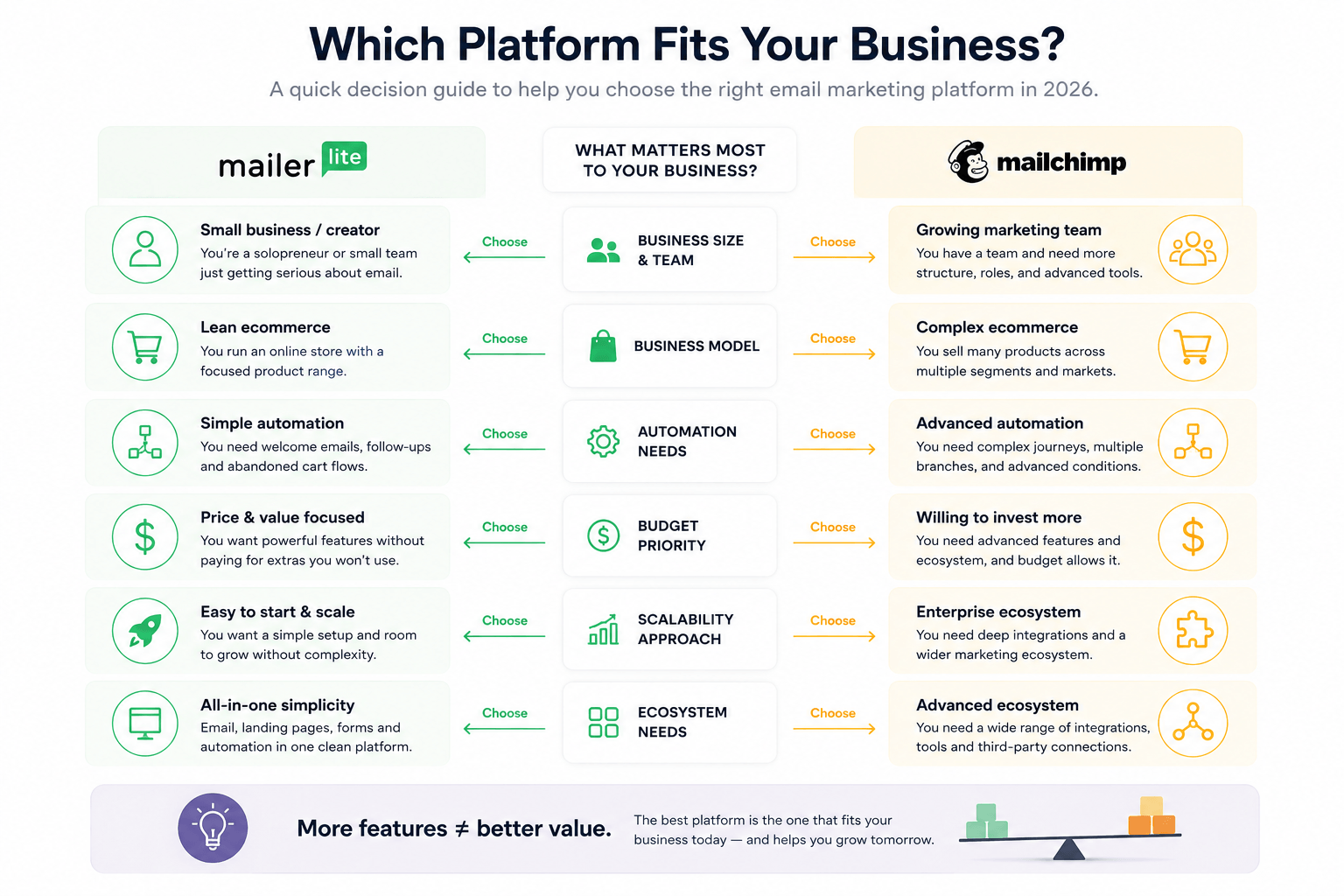
Here’s how I would make the decision.
Choose MailerLite if:
- you’re a solopreneur or small team;
- email is your main marketing channel;
- you want an easier automation builder;
- you need landing pages and forms alongside email;
- you care about keeping software costs predictable;
- you want unlimited sending on the Power plan;
- you prefer a simpler interface;
- you want to launch campaigns without a long learning curve.
Choose Mailchimp if:
- you need deeper behavioral targeting;
- your business relies heavily on Mailchimp’s ecosystem;
- your marketing operation is becoming more complex;
- you need advanced segmentation and personalization;
- you have a team that can actually use those capabilities;
- the additional cost is justified by features you need now.
My Verdict: MailerLite Is the Better Buy for Most Small Businesses
For 2026, my choice for the average small business is MailerLite.
Not because Mailchimp is bad.
It isn’t.
Mailchimp is a capable, mature marketing platform. If you need its deeper automation, segmentation or ecosystem, there are good reasons to pay more.
But for a small business, every software subscription should answer one question:
What am I getting for the extra money?
If the answer is “features I might use someday,” I’d keep the money.
If the answer is “a workflow that saves my team several hours every week and generates more revenue,” then the higher price starts to make sense.
That’s why MailerLite wins this comparison for me.
It covers the core email and ecommerce workflows most small businesses need, keeps the interface relatively easy to work with, and gives growing teams room to scale without immediately turning email marketing into a complicated software project.
Mailchimp is the better choice when you have outgrown that simplicity.
MailerLite is the better choice when you haven’t.
My final score
MailerLite: 9/10 for small businesses and lean ecommerce teams
Mailchimp: 8/10 overall — and potentially 9/10 for businesses that genuinely need its deeper ecosystem and behavioral capabilities
The winner isn’t the platform with the longest feature list.
It’s the platform that gives you enough power without making you pay for complexity you don’t need.
Right now, for most small businesses, that’s MailerLite.
Want to Try MailerLite?
If you want to see whether the simpler approach works for your own business, you can start with MailerLite’s free plan and test the workflow before committing to a paid subscription.
I don’t recommend upgrading simply because a pricing page tells you that you should.
Build one newsletter.
Create one welcome sequence.
Connect your store.
Set up one useful ecommerce automation.
Then decide.
That’s a much better test than scrolling through a feature comparison and convincing yourself that you suddenly need 47 automation triggers.
Affiliate disclosure: This article contains an affiliate link. If you choose to purchase MailerLite through the link above, E.Gerion Reviews may receive a commission at no additional cost to you. Our editorial assessment remains independent of any affiliate relationship.
Want to see whether the simpler approach works for your own business? You can https://www.mailerlite.com/?linkId=lp_170762&sourceId=egerionreviews&tenantId=mailerlite before committing to a paid subscription.